Save media.
Keep it in order.
Save the images, GIFs and videos you choose. Give them useful filenames and folders, and follow each download from start to finish.
Latest GitHub release: 3.0.7. The Store listing updates separately.

An example of your saved files
- Downloads
- Content
- x
- username
- Image
2026-11-04_14-35-12_x_username.jpg
Choose the folders and filename fields in MediaLatch.
From the page to your folders.
- Save one item or a gallery
- Use on-page controls or right-click the media. Supported gallery controls can save several items from a post. Available sources and formats depend on the website and your existing access.
- Choose the filing rules
- Build folder paths from the site, author and media type. Choose filename fields and keep separate saving profiles for your computer and each cloud destination.
- Follow every download
- The toolbar popup shows the queue. Open the manager for saved results, cancellation, supported retries and error details. Speed and remaining time appear when they can be measured.
- Share a post link
- Copy links using your selected preview service. Third-party previews depend on the service and the destination app.
Your computer, or your cloud
Version 3.0.7 saves locally and offers optional Google Drive and Yandex Disk connections. Choose a destination for new saves; work already queued keeps its destination.
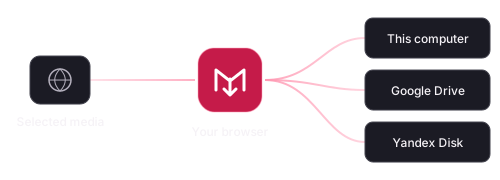
Connect an account through OAuth or a supported access token. Google Drive sign-in requests drive.file; Yandex uses its application folder. A cloud connection is not required for local saving.
Uploads go directly from your browser to the selected provider. MediaLatch has no developer-operated media server, advertising or analytics.
If the selected cloud is unavailable, MediaLatch reports the problem rather than silently saving the file to your computer.
Connection guideHow cloud data is handled

In development
More destinations.
A place to prepare posts.
MEGA uploads and Telegram channel posting are in development. The Telegram editor can keep local drafts and preview posts with captions and media.
Telegram account sign-in through MTProto and Telegram-native scheduling are planned, not implemented. Release notes will identify when new features are available.
Follow releasesBugs and questions
Include your extension version, browser, source page and what happened in GitHub Issues. Keep passwords, access tokens and private media out of public reports.
Send private security or privacy questions to always1337@vk.com. MediaLatch is maintained by fs0x1337 at NoizWorks. You can support development on Boosty or DonationAlerts.